Still, if
960GB of flash storage is what you want, then Kingston will provide it. The
SSDNow v310 ‘range’ isn’t so much a range as just this one drive, lording it
over the 480GB maximum size that the SSDNow v300 range hit. The unit packs a
Phison 3108 controller alongside nearly 1TB of storage all into a 7mm chassis,
and it’s available to buy alone or in an upgrade pack complete with cables and a
caddy for your old drive.
Showing posts with label Komputer. Show all posts
Wednesday, November 18, 2015
Tuesday, November 17, 2015
Logitech G19s
Keyboard
Published: By:
Unknown
- November 17, 2015
Logitech
pioneered the keyboard screen in its G15 keyboards, and the feature was quickly
picked up by the homebrew crowd, who designed their own bespoke apps for it.You
might be a little confused by the fact that this is by far the most expensive
keyboard in this little test, and that it’s also the only lowly membrane switch
device we’ve included. But looky here, there’s an LED screen sitting above the function
keys.
Friday, November 13, 2015
Aorus X7 v2
Gaming Laptop
Published: By:
Unknown
- November 13, 2015
The Aorus, a
Gigabyte by any other name, crams a lot into a case that measures 22.9mm thick
and weighs 3kg – less than the average mass of another hot thing that purrs
loudly on your lap.
The pair of
GeForce 860M GPUs (Kepler, not Maxwellgeneration chips) in SLI configuration
have 4GB of memory each, and there’s a further 16GB of system RAM for the
i7-4860HQ. There are also three 120GB SSDs in a striped RAID 0 set up for more
storage performance. The new 802.11ac variant of Wi-Fi is nice to see, as is
the ‘killer’ LAN interface that claims 0 per cent packet loss. The inbuilt
speakers are decent too, with woofers that give sound a thick, meaty quality.
Tuesday, November 10, 2015
AOC U2868PQU
Monitor
Published: By:
Unknown
- November 10, 2015
Now, you could
argue that it’s hardly surprising this AOC is competitive with the other 28-inch
4K monitors on offer. A screen is only as good as its LCD panel and, as far as
we know, there may only be one 28-inch TN 4K panel being made right now. That
means there’s a chance all three 28-inch models on test this month use the same
panel.
Sunday, November 8, 2015
MSI X99S Gaming 7
Motherboard
Published: By:
Unknown
- November 08, 2015
Motherboard,
and a better feature set than you’ll find in the lowest end of the X99 range.
That’s especially important if you’re looking at the overclocking performance
of the six-core CPU SKUs. We haven’t had a chance to check out how well the i7
5820K overclocks, but MSI’s X99 Gaming 7 is only 50MHz shy of the top clock we
managed on our engineering sample i7 5960X. That bodes well for how it will
perform with the cheaper chip, and makes us excited about the powerful machines
we’ll be able to put together with this new range, without breaking the bank.
Wednesday, November 4, 2015
Aria Gladiator Hellion 1000
Gaming PC
Published: By:
Unknown
- November 04, 2015
As nice as
those numbers are though, they don’t tell thewhole story. As ever, it’s all about
the graphics card Aria has decided to pair with the Intel silicon, and in this
case it’s opted for an AMD GPU. That’s a rare choice, which is a shame as AMD
is making some fantastic graphics cards at the moment. In fact, the R9 280X is
probably one of the best value cards around right now.
Tuesday, November 3, 2015
ZOTAC GTX 750
Graphics Card
Published: By: Unknown - November 03, 2015
Silencing the
ZOTAC GeForce GTX 750 ZONE Edition is an exclusive dual slot fanless heatsink
that ensures the card operates at optimal temperatures for long gaming
sessions. The heatsink consists of copper heat-pipes and aluminum fins to
leverage the heat transfer qualities of copper and the heat dissipation
abilities of aluminum. ZOTAC International, a global innovator and manufacturer
of graphics cards, has silenced the powerful ZOTAC GeForce GTX 750 graphics
card with a new passive cooled ZONE Edition. The ZOTAC GeForce GTX 750 ZONE
Edition graphics card combines the gaming prowess of the NVIDIA GeForce GTX 750
GPU with a zero noise cooling system to deliver a quiet PC gaming experience with
class-leading features.
Published: By: Unknown - November 03, 2015
Monday, November 2, 2015
HP TF C10
Memory Cards
Published: By:
Unknown
- November 02, 2015
The HP TF
Micro SDHC and SDXC class 10 significantly improves a consumer’s digital
lifestyle with breakthrough performance in speed and capacity, its fast data
transfer speed make it an ideal storage media. PNY Technologies has officially
announce the release of the HP TF Class 10 memory cards. Today the need for
more data storage has become more important than ever.
Sunday, November 1, 2015
Philips 288P6LJEB
Monitor
Published: By:
Unknown
- November 01, 2015
The Philips
Brilliance 288P6LJEB bisects the AOC and Asus models pretty precisely on price.
Now, if you’ve read the reviews of the other two, you’ll know that neither
quite nails it. The AOC was well above expectations in many regards – it edges
the Asus for static image quality and it’s about £100 cheaper – but it suffers
from some input lag that sees the Asus suddenly back in the running.
ADATA Premier SP610 SSD
Storage
Published: By:
Unknown
- November 01, 2015
The SSD supports SATA III (6Gb/s) interface and comes with SMI controller that ensures stable performance with high read/write speeds. In our tests, we got read speeds up to 520MB/s and write speeds up to 240MB/s, which is pretty good. ADATA Premier SP610 retails for a price of around Rs. 9,000 on online stores and coupled with good performance, the SP610 gives little reason to disappoint.
Thursday, October 29, 2015
Seagate Backup Plus Slim
Hard Drive
Published: By:
Unknown
- October 29, 2015
Seagate also bundles the
drive with the Seagate Dashboard software that enables a one-click backup
solution. Unlike most backup software, Seagate Dashboard can backup data from
social media accounts, including Facebook, Flickr and YouTube. The software
also allows uploading content to the aforementioned social media sites and
scheduling of backups with a backup plan. Seagate Backup Plus Slim is a tiny
drive but with a decent amount of storage and the Dashboard backup software,
the Backup Plus Slim is a compelling buy.
Logitech G402 Hyperion Fury
Mouse
The reason this gaming rodent is
so pacey is because of the Fusion Engine sensor at its heart. It’s called a
hybrid sensor because it’s not simply relying on optical sensors to track the
movement of the mouse across a given surface, it’s also using a built-in accelerometer
and gyroscope.
ASUS Maximus VII Formula
Motherboard
In fairness, a
£250
LGA1150 board was always going to be a non-starter as a value proposition. That
Haswell-E comparison is a little unfair too, especially when you consider the
erratic pricing of DDR4 memory right now. Until that normalises, any
properlyconfigured Haswell-E rig is going to be pretty pricey.
Wednesday, October 28, 2015
Corsair Vengeance DDR4 16GB
RAM
Such ennui probably has something
to do with the fact that your choice of memory module won’t make a huge difference
to the overall PC experience, either. That’s going to be the tough ask for manufacturers
of highperformance DDR4 memory modules in this new frontier of RAM: when even
the cheap stuff has to match the new Intel platform’s 2,133MHz starting point,
across four modules for the true quadchannel experience, you’re already talking
about some seriously quick memory.
Tuesday, October 27, 2015
ASUS X99
Motherboard
Published: By:
Unknown
- October 27, 2015
The brand new Haswell-E range is
the first to bring a fully-fledged octo-core Intel processor into the consumer
market. Through the magic of Hyper-Threading, that means 16 threads of
processing that should be capable of chewing through any multi-core optimized application
faster than you can say, er, multi-core optimized application (pithy - Ed).
Corsair Vengeance K70
Keyboards Gaming
Published: By:
Unknown
- October 27, 2015
The red glow emanating from
beneath the black keys and gleaming from the black brushed aluminium makes this
a very eye-catching board.The rolling volume control, additional media,
lighting and Win key controls are all welcome additions too, as is the pass-through
USB connection on the rear of the keyboard.
Corsair’s Vengeance K70 has been
around for some time now, but it remains our favourite mechanical switch
keyboard in terms of both functionality and aesthetics. The original K60
brought the somewhat industrial, brushed aluminium design to the party, but the
more advanced K70 added mechanical switches on every key, individual LED lighting
and full N-key rollover.
Corsair has recentl yreleased the
RGB version of this board, which allows the user to change the colours, but we’re
still taken by the red tinge of this original. And the added bonus is that it
costs a good deal less than the more recent, rainbow-coloured design.
Aesthetics aside, the K70 is also
an incredibly responsive keyboard that’s just as good for gaming as it is to
spend your days typing on.The build quality matches that high-end aesthetic,
too. Where the first K60 wasn’t the most reliable of boards, we’ve been using
the K70 has on a daily basis without ever encountering a problem with it.
Thursday, October 22, 2015
HyperX Its High Speed USB
A 5-year warranty, free technical
support and legendary HyperX reliability. For more information visit the HyperX
home page. HyperX is the high-performance product division of Kingston
Technology encompassing high-speed DDR3 memory, SSDs, USB Flash drives, and
headsets. Targeted at gamers, overclockers and enthusiasts, HyperX is known
throughout the world for quality, performance and innovation. HyperX is
committed to eSports as it sponsors over 20 teams globally and is the main
sponsor of Intel Extreme Masters. HyperX can be found at many shows including
China Joy, PAX, Davao Cyber Expo, and TGS & Big Fes.
HyperX
FURY USB has an aggressive case design with colored aluminum accents to stand
out from other USB Flash drives while complementing PCs and consoles1. It will
be available in 16GB (red), 32GB (blue) and 64GB (black) capacities and is
ideal for storing games, music, photos, videos and files. HyperX FURY USB keeps
data moving with USB 3.0 performance (90MB/s read, 30MB/s write) and is also
compatible with USB 2.0.
Sunday, October 18, 2015
Bitfenix Colossus Mini
PC Chassis
Colossus Mini ,but its imposing size does allow it to offer quite a lot of flexibility when it comes to storage and cooling option, if oxymoronic name for this Bitfenix case. It’s quite big for a chassis that only supports a mini ITX motherboard.
If case lighting is your thing then the Colossus Mini ITX might tempt you. It has a light strip that runs up the side of the case, across the front and down the other side, and can display blue, green or red light. It shows as a white strip when the lighting is switched off.
Storage handling in the Colossus Mini is neatly done and things are a little different from what at first glance they appear to be. There are two drive cages, one on top of the other; the top one supports five drives, the bottom one two. One can be fitted to the base under where the cages sat, while two more can be mounted vertically on the side of the PSU cage – ingenious! The drive trays are tool-free for 3.5in drives but 2.5 drives have to be held in place by screws. The 5.25in bay can also be adapted to hold a normal drive if needed. Both cages are removable, the top one by means of latches top and bottom, the bottom one by removing six screws in the base of the case. Now the clever bit: if you’re planning to use just 2.5in drives then you can ditch both these cages to allow for better air circulation, as there are a couple of other places to mount the drives.
As for cooling, the case comes with a couple of 120mm fans, one in the front and one in the rear. There are mounts for another 120-200mm fan to be added to the front, while two more 120mm fans can be fitted into the roof of the case. Fitting them is made easier by the fact that the top grille can be easily removed. Published: By: Unknown - October 18, 2015

Colossus Mini ,but its imposing size does allow it to offer quite a lot of flexibility when it comes to storage and cooling option, if oxymoronic name for this Bitfenix case. It’s quite big for a chassis that only supports a mini ITX motherboard.
If case lighting is your thing then the Colossus Mini ITX might tempt you. It has a light strip that runs up the side of the case, across the front and down the other side, and can display blue, green or red light. It shows as a white strip when the lighting is switched off.
Storage handling in the Colossus Mini is neatly done and things are a little different from what at first glance they appear to be. There are two drive cages, one on top of the other; the top one supports five drives, the bottom one two. One can be fitted to the base under where the cages sat, while two more can be mounted vertically on the side of the PSU cage – ingenious! The drive trays are tool-free for 3.5in drives but 2.5 drives have to be held in place by screws. The 5.25in bay can also be adapted to hold a normal drive if needed. Both cages are removable, the top one by means of latches top and bottom, the bottom one by removing six screws in the base of the case. Now the clever bit: if you’re planning to use just 2.5in drives then you can ditch both these cages to allow for better air circulation, as there are a couple of other places to mount the drives.
As for cooling, the case comes with a couple of 120mm fans, one in the front and one in the rear. There are mounts for another 120-200mm fan to be added to the front, while two more 120mm fans can be fitted into the roof of the case. Fitting them is made easier by the fact that the top grille can be easily removed. Published: By: Unknown - October 18, 2015
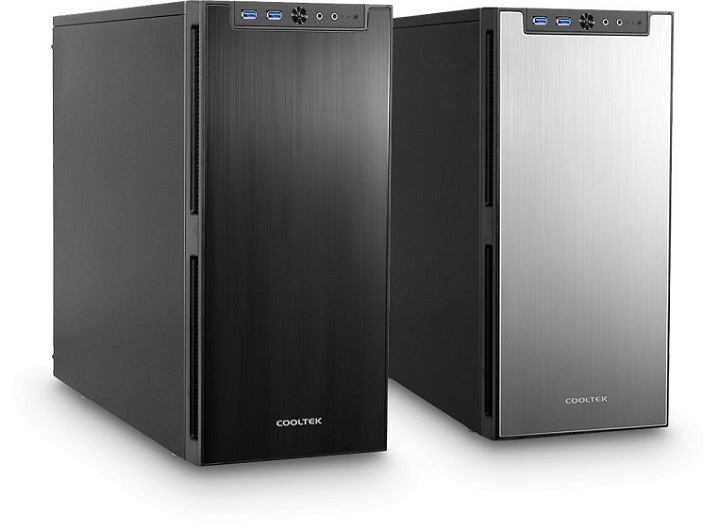
Cooltek Antiphon
PC Chassis
Cooltek may be a new name to some,built around a quoted 1.35kg of insulation material that’s used inside it, but this German company has been in the casemaking business since 2003. The Antiphon has been designed as an ultra-quiet case.
There are three of Cooltek’s own CT-120 120mm fans installed, two behind the front bezel and one on the rear panel, and there is a mount for a fourth in the base of the case. A dual-speed fan controller is fitted which can control three fans, but annoyingly this is fitted to the base of the front bezel so you have to keep opening the front door to operate it.
Cooltek provides the Antiphon with separate drive cages for 3.5in and 2.5in drives, each cage holding up to four drives, with the cage for the smaller drives sitting above the larger one. Both cages are firmly fixed in the case, which is the reason there is a 320mm limit on the length of graphics card that can used with the case. The cages don’t have removable trays but instead the drives are held in place using plastic slides – not quite as secure as a tray, but still better than having to ge the screwdriver out.
This is all designed to keep any panel vibration down to a minimum – and with the case being made of steel there might well be a lot of vibration to dampen. This soundabsorbing material is applied to both side panels, the inside of the front door and the roof of the case. Also helping to reduce any vibration noise are the four decoupled feet that the case uses, and the four rubber pads the PSU sits on. Cooltek has even gone so far as to put padding around the opening for the PSU, to prevent any vibrations from the power supply going directly into the case.
Saturday, October 17, 2015
Desktop PC Protect
Keep OS Patched
Could real people actually be as clueless as some of those characters we see in movies? sadly, you need no more evidence of that cliché than the average computer user. Even though he or she knows that an OS update is as critical as, say, nailing boards over your windows in a zombie apocalypse, many choose to ignore the updates until something crawls in and eats their brains. The most basic security step PC users should take—regardless of OS—is to install the latest updates. Yes, we know, it can be teeth-gritting—especially when the updates are larger than the original OS—but it’s necessary for patching holes being used by attackers to squeeze into your PC.
Keep Applications Patched
Even Microsoft haters have to admit the company has done an admirable job patching its operating systems in a reasonable amount of time. Because of this, many of the weak spots on a PC aren’t even the OS anymore, but rather the third-party applications. While Microsoft will patch its own products in Windows Update, it doesn’t do squat about anything else. With literally dozens of apps to check for updates every week,you can see where the problem lies. That’s why we run Secunia’s PSI Scanner. The free app runs in the background and checks your installed apps and plugins for available updates and then gives you a link of where to download the patch. The latest beta version will actually install some of the updates for you. The company also offers an online scanner but we don’t recommend it because it runs in Java.
Lose Windows XP
Windows XP was a great operating system but it’s now over 10 years old and it’s a popular target for attacks. Why? It’s not as secure as its replacements. It’s also where the money is—literally—with 51 percent of computers on the planet running it. Many attacks specifically target XP and ignore Windows Windows 7 and 8 completely. Unless you like to wrench on your OS all day, we recommend that you give XP the retirement it has earned.
Use a Virtualized Browser
Since the vast majority of attacks are coming from the browser, one of the safest ways to surf the web is from a virtualized browser or a virtual machine. One of the simplest ways to accomplish this task is to build a virtual machine using either virtual PC 2007 or VM Ware Player. Both are free, and both Microsoft and VM Ware offer free images that include browsers. Microsoft offers Vista and XP with IE8 installed and VM Ware offers Ubuntu with Firefox installed. Of the three options, VM ware’s is the most solid but folks not used tolinux might be thrown for a loop. Microsoft’s
images time out after three months, so you’ll have to download it again.
Restrict PC Access
for Others so, you’ve created this incredibly secure moat, ringed with razor wire, claymores, and mines. And then you let your 14-yearold nephew play some Flash games or “check email.” Right. The best solution is
to have visitors use a separate, secured guest PC. But if they must use your machine, make sure you have the guest account activated. Another option is to have them use a virtual machine. Once they’re done, simply shut down the VM and erase any trace of their activities. Or have them use your HTPC, where they’re working in the open instead of being left alone in your office. Published: By: Unknown - October 17, 2015
Subscribe to:
Posts (Atom)